CGHS: विशेषज्ञ डॉक्टर से अपॉइंटमेंट ऑनलाइन बुक करें।
CGHS Online Doctor Appointment @ www.cghs.nic.in 2026; CGHS Online Appointment Fixing Process 2023: The Central Government has recently launched a new online appointment booking portal for CGHS beneficiaries with a simple and user-friendly process. Beneficiaries can easily book appointments using their mobile phones and consult their preferred doctors without any difficulty.
All beneficiary details, including spouse and dependent information, are clearly displayed in the individual dashboard panel, making the process more convenient and transparent.
This initiative is considered a highly beneficial move, especially for senior citizens. Many state government pensioners are also expecting similar digital healthcare facilities and appointment systems to be introduced for their medical services.
How to book an online appointment in the CGHS portal?
CGHS Online Doctor Appointment @ CGHS Official Website (Updated May 2026)
Step 1: Visit the official website of the Central Government Health Scheme at CGHS Portal.
Step 2: On the homepage, click the yellow-colored “Book Online Appointment” button located at the top-right corner.
Step 3: Enter your registered mobile number.
Step 4: Complete the OTP verification process. After successful validation, you will be redirected to the dashboard.
Step 5: Select the beneficiary name. The options will include Self, Spouse, and Dependents linked to your CGHS account.
Step 6: Choose the doctor’s name from the dropdown menu and select your preferred appointment date.
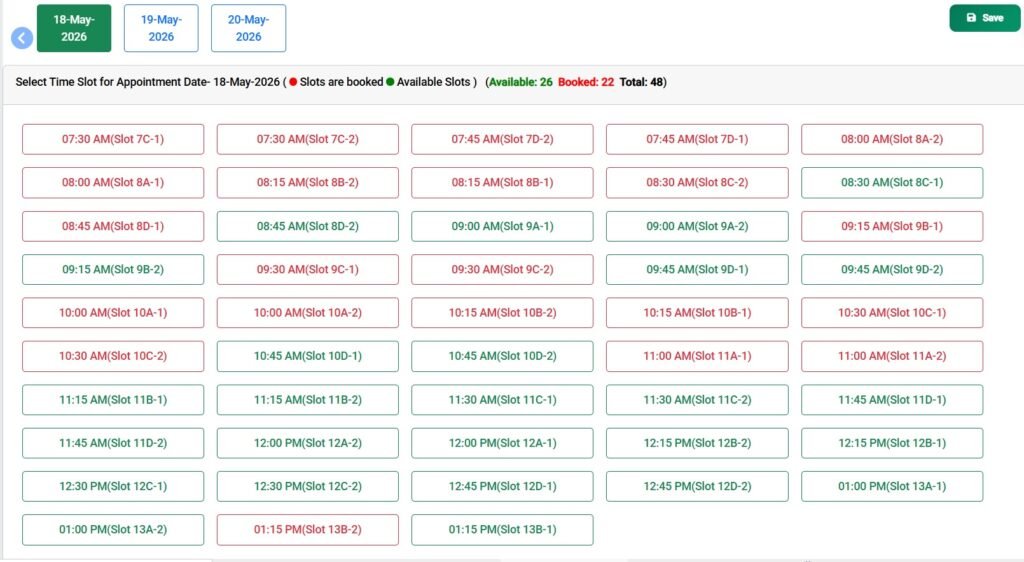
Step 7: Select an available appointment slot. Appointment timings generally begin from 7:30 AM and continue up to 1:15 PM, with a total of 48 slots available each day. Once you click a slot, the background color will change to indicate selection.
Step 8: Enter your comments or remarks, if required.
Step 9: Click the Save button located on the right-side corner of the page.
Step 10: After successful booking, a confirmation message will appear on the screen, similar to the following:
“Appointment Successful. Appointment No. 0000000000. Date & Time: 00-May-2026, 10:45 AM. Kindly save this information for future reference.”
How to update my mobile number in CGHS Portal?
To update your mobile number in the CGHS Portal, please follow the steps below based on whether your mobile number is already registered in the system or not. If your mobile number is not registered, please contact the CMO I/c of your dispensary and bring your mobile phone with you to receive an OTP that will be sent to your mobile phone when the CMO I/c enters your mobile number in the CGHS system.
If you want to update a mobile number that is already registered with CGHS, you can do so yourself by logging in to the CGHS Portal using the ‘Beneficiary login’ option that is available on the home page of cghs.nic.in. If you do not have or remember your login credentials and want to register another mobile number with CGHS, you can select the ‘Generate/Reset Password’ option on the beneficiary login page. Please note that the password will be sent to your old mobile number. If you do not have access to your old mobile number and want to update a new one in the CGHS system, kindly approach the CMO I/c of your dispensary.
For further assistance, you can refer to the ‘Help’ section on https://cghs.nic.in or click on the link https://cghs.nic.in/Steps_to_update_Mobile_Number.pdf.
If you receive a message saying that an appointment has already been booked but did not receive a confirmation message, please click on the option ‘To Receive Reconfirmation SMS / View / Print / Cancel Appointment Click Here’ to confirm the appointment status and receive a confirmation SMS again.
To view, print or cancel a CGHS online appointment, please go to the book appointment option, enter your beneficiary ID and the OTP received. On the landing page, select the option ‘To Receive Reconfirmation SMS / View / Print / Cancel Appointment Click Here’.
If you click on the ‘Generate OTP’ button and do not receive an OTP after a few minutes, you can click on the link provided.

![CGHS Family Dependent Rules for Central Government Employees [Updated 2026]](https://7thpaycommissionnews.in/wp-content/uploads/2023/08/CGHS-Family-Dependent-Rules-for-Central-Government-Employees-Updated-2026-150x150.jpg)

Leave a Reply